Here's why our customers love us!
Recognized and trusted globally!
Recognized globally
Privacy is the priority


Fair pricing: Pay for your contacts, not for every email send
Whereas Mailchimp caps your monthly sends at 10x your contact count on Essentials, 12x on Standard, and 15x on Premium, Zoho Campaigns gives you unlimited emails on paid plans. We don't charge overage fees; Mailchimp bills you when you go over your contact or send limit. You also get up to 20 users with Zoho Campaigns, while Mailchimp includes three seats on Essentials and five on Standard. Compare our plans for the full breakdown.
Monthly price by number of contacts
- Zoho Campaigns
- Mailchimp
500contacts
2,500contacts
5,000contacts
10,000contacts
25,000contacts
50,000contacts
Zoho Campaigns Pro plan, billed monthly. Mailchimp Standard plan, billed monthly after introductory discounts. Prices in USD, excluding taxes. Prices verified: September 2026
Zoho Campaigns vs. Mailchimp
| Feature |  |  |
|---|---|---|
| Monthly email sends | Unlimited on paid plans | 10x contacts (Essentials), 12x (Standard), 15x (Premium) |
| Overage charges | None | Applies if contact or send limit is exceeded |
| Users included | Up to 20 | 3 seats (Essentials), 5 (Standard), unlimited (Premium) |
| Free plan | 2,000 contacts · 2,000 emails/mo · 5 users | 250 contacts · 500 emails/mo · 250/day cap · 1 user |
| What happens at the free limit | Users are notified via email about the limit | User is pushed to the next tier. |
| Custom-coded templates | All plans | Essentials: Create only; upgrade to send |
| Free migration help | All paid plans | Premium only |
| Onboarding | 60 days, multiple sessions | 1 session (Standard), 4 (Premium), none on Essentials |
| Email cadence policy |
What sets us apart?
Auto-segmentation
Segment your email list based on 50+ preset fields (such as country or gender) with our automatic, advanced, and easy-to-use segmentation. Add a single criterion or several, all with a single click.
On Mailchimp's Essentials plan, segmentation is basic; advanced segments need Standard or above.

Seamless scaling
Expand your marketing by connecting Campaigns with other Zoho applications. Nurture leads through Zoho CRM, boost webinar registrations with Zoho Meeting, and gather insights through Zoho Survey.
Mailchimp covers email well, but for CRM, webinars, or surveys, you'll need separate third-party tools.

Workflow automation
Add your audience to a workflow from multiple sources, such as lists and signup forms, and move contacts across different automation paths or into entirely new workflows.
On Mailchimp's Essentials plan, automation flows are limited to four steps, and branching paths need Standard or above.

Emails without limits
Use Zoho Campaigns to email your customers as often as your strategy calls for; no arbitrary sending limits hold you back. That freedom lets you get the most out of every list you've built.
In contrast, Mailchimp caps monthly sends at 10x, 12x, or 15x your contact count, depending on the plan.

Smart user management
Collaborate and manage your account with ease. Modularize organizational activity and delegate routine operational tasks for maximum productivity and efficiency with Zoho Campaigns, with up to 20 users on your account.
Mailchimp includes three seats on Essentials, and five on Standard; unlimited seats need Premium.

Custom templates
Zoho Campaigns offers custom-coded templates to users on all plans, so your coders can build templates that match your brand exactly and keep full control of the experience.
On Mailchimp's Essentials plan, you can create custom-coded templates but must upgrade to send them.

SMS marketing
Reach your contacts faster than ever. Zoho Campaigns' SMS feature lets you send SMS campaigns to your contacts anywhere, anytime, and include them in your workflows.
On Mailchimp, SMS is a paid add-on to your plan and isn't available on the free plan.

WhatsApp marketing
Reach customers on WhatsApp, natively. Send bulk promotional messages, automate marketing and utility communications, and track delivery, reads, and responses—all from Zoho Campaigns.

How to switch from Mailchimp to Zoho Campaigns
- 1
Export your audience from Mailchimp.
Download each audience as a CSV file, including tags and custom fields, so you have a clean copy of every contact.

- 2
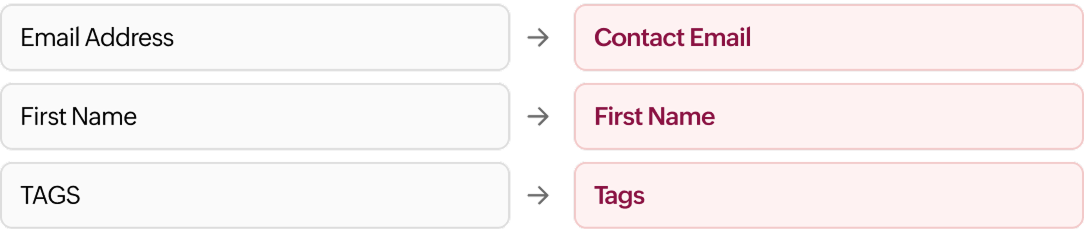
Import it into Zoho Campaigns.
Upload the CSV file and then map your Mailchimp fields to Zoho Campaigns fields.
- 3
Rebuild your lists and segments.
Rebuild them using auto-segmentation.
- 4
Recreate your automations.
Set up your welcome series, drip campaigns, and other journeys using our email automation workflows.
- 5
Send a test campaign.
Send to a small internal list first and check rendering, links, and tracking before you move all your sending over.
Note: Every paid Zoho Campaigns plan includes free migration help, along with 60 days of onboarding across multiple sessions. On Mailchimp, free migration help is only offered on the Premium plan.
8xthe contacts on Mailchimp's free plan
Complete email marketing bundle
A forever-free plan
Start with our Forever Free plan: 2,000 contacts, 2,000 personalized emails per month, and five users, at no cost. That's eight times the contacts on Mailchimp's free plan, and when you're ready for more, you upgrade on your terms.
Count contacts, not sends
Your Zoho Campaigns plan is priced based on your contact count, and every paid plan includes unlimited emails. Email your audience as often as your strategy needs, without watching a monthly send meter or budgeting for overages.
Free three-channel support
We're available to guide you through your email marketing journey at no extra cost. Reach us by phone 24/5 or through email 24/7. To provide you with an instant solution, we have plenty of user guides and downloadables stocked up in our resource library.
Easy integration
Use single sign-on to reach more than 40 Zoho applications and bring in the data you need, or connect your other business, social, and ecommerce tools. Zoho Campaigns works on the web, Windows, Mac, iOS, and Android.
Everything you need to replace Mailchimp
- Get unlimited emails on every paid plan, with no send cap to track.
- Add, segment, and manage all your contacts in one place.
- Use multiple scheduling options to send when your audience is reading.
- Send SMS campaigns alongside your email campaigns.
- Deploy ready-to-use workflow templates, or build your own workflow from scratch.
- Check list-based and campaign-based comparison reports.
- Use custom-coded and ready-made email templates on all plans.
See all our
Email marketing featuresFrequently asked questions
The biggest difference is billing. Zoho Campaigns gives unlimited emails on paid plans with no overage fees, while Mailchimp caps monthly sends at 10 to 15 times your contacts. Zoho Campaigns also includes up to 20 users, custom-coded templates on all plans, and free migration help on every paid plan.
Zoho Campaigns is part of a larger Zoho suite, so we don't have to price every feature as a separate upsell. You pay by contact count, with unlimited sends on paid plans and no overage charges. At some sizes the gap is small, so compare our plans at your exact contact count.
Not on paid plans. Every paid Zoho Campaigns plan includes unlimited emails, so you can send as often as your strategy calls for without tracking a monthly cap or paying overage fees. The Forever Free plan includes 2,000 emails per month for up to 2,000 contacts.
Your audience moves across easily: Export it from Mailchimp as a CSV file and import it into Zoho Campaigns. Templates are harder, since their HTML usually needs some rework, and automations must be rebuilt. Historical campaign reports stay in Mailchimp. Free migration help is included on all paid plans.
Zoho Campaigns' Forever Free plan covers 2,000 contacts, 2,000 emails per month, and five users. Mailchimp's free plan covers 250 contacts and 500 emails per month, with a 250-per-day cap and one user. When you reach Mailchimp's limit, sending pauses until you upgrade or remove contacts.