What is email spoofing?
Spoofing is defined as the technique used by email fraudsters to trick recipients into opening potentially unsafe messages by forging certain content in the header of the email. The recipient believes that the email originated from a trusted sender and follows the steps given in the message, leading to unexpected outcomes (such as account compromise, loss of personal data, etc.).
How does email spoofing work?
Emails use the Simple Mail Transfer Protocol (SMTP) to send messages across the internet. When a user sends an email, the message might travel between multiple servers before it reaches the intended recipient. Since SMTP does not have a built-in mechanism to authenticate the legitimacy of the email's source, cybercriminals can easily spoof the identity of the sender by modifying certain fields of the email.
Below are some of the fields which a spammer forges:
- From - This is the email address which the recipients see when they receive an email. Users tend to open the message if the "From" address appears to be a trusted sender/ domain.
- Reply-To - The "Reply-To" field specifies the email address to which the replies should be redirected to. Spammers add their preferred email address so that they get a response when a user replies to the spoofed email.
- Return-path - This is the email address to which the bounce messages are sent.
Attackers modify one or more of the above fields thereby forcing the recipients to make a mistake. The users will never know the real identity of the sender unless they inspect the original email header.
Why do attackers spoof emails?
Attackers spoof emails to impersonate trusted individuals or organizations and trick recipients into taking harmful actions. By making emails appear to come from legitimate sources, attackers can:
- Steal sensitive information: Trick recipients into revealing passwords, financial details, or personal information.
- Spread malware: Convince recipients to click malicious links or download infected attachments.
- Commit financial fraud: Impersonate executives, colleagues, or vendors to request fraudulent payments or fund transfers.
- Gain unauthorized access: Steal login credentials to compromise accounts and access confidential data.
Types of email spoofing
Email spoofing can take many forms:
- Display name spoofing - The attacker fakes the identity or display name of a person that the email recipient might trust.
- Domain spoofing - If the recipient has subscribed to emails from a trusted domain, the attackers can impersonate the domain to deceive them.
- Look-alike domain spoofing - In this case, a domain mentioned in the email address is used to deceive the recipient visually by sending emails from a similar domain. For example, if the letter 'o' in the domain address is replaced with a '0', the recipient is visually tricked into believing that the email is from a trusted source.
Example of spoofed email
While there are many email spoofing instances, the example shown below is the most common which many users come across. The sample email shown below urges the recipient to reset his password.
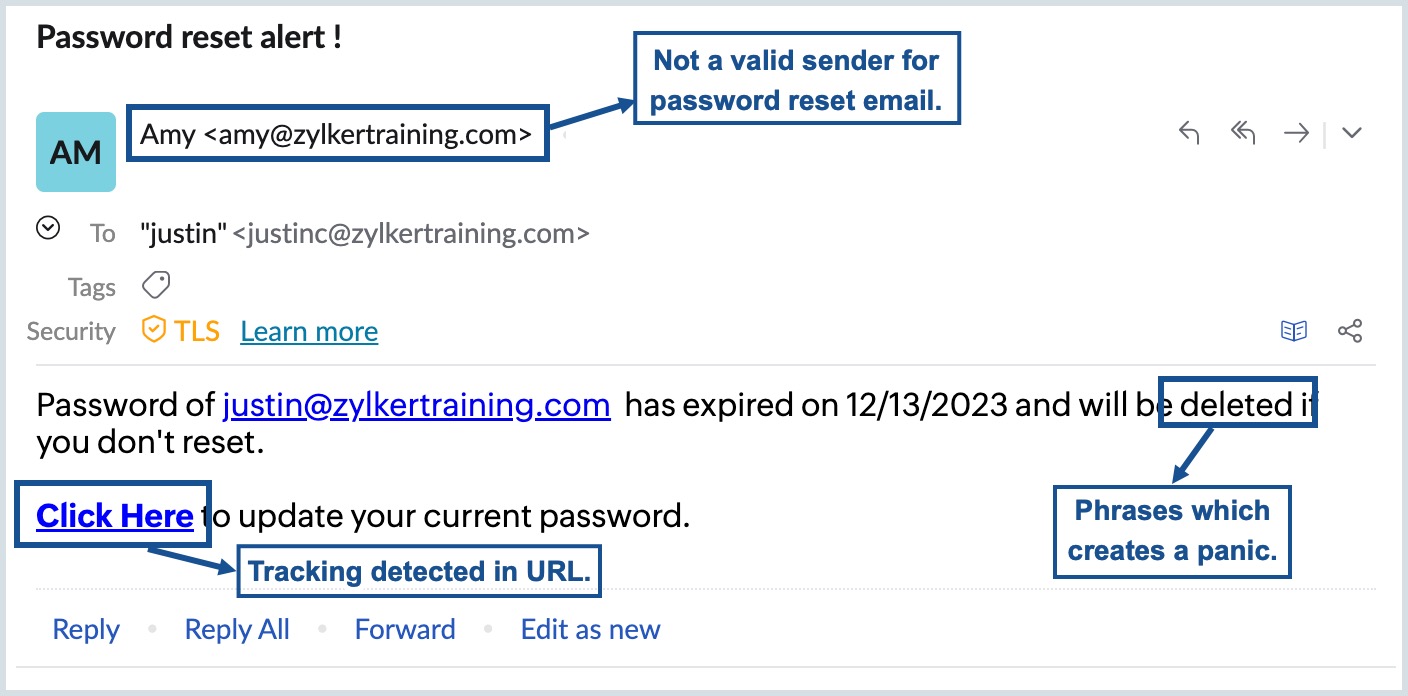
If an email is suspected as a spoofed, inspect the headers and view the original header information and look for any discrepancies such as display name spoofing, break in header chain etc. The images that follow are classic examples of how to identify spoofed emails using the header information.
Breakage in header chain

Display name spoofing

Note: The example is given only as a reference to guide users to stay vigilant about email spoofing. Actual email spoofing attempts can differ from case to case.