Automating Zoho Analytics web data ingestion with Zoho RPA

- Problem statement
- How Zoho RPA helps
- What changed with Zoho RPA
- How Zoho RPA empowers analytics and operations teams
- Ready to automate report collection and analytics updates?
Problem statement
Every morning, the operations team opens Zoho Analytics to review their dashboards. The numbers are clear, visual, and decision-ready. For most systems, data flows in easily through built-in connectors and simple imports.
But a few critical reports live elsewhere, behind third-party portals and internal websites that only offer UI-based downloads.
That’s where the routine begins. An analyst logs in, navigates through multiple web applications, downloads the data in Excel or PDF format, cleans up the data manually, organizes those files, and uploads them into Zoho Analytics so the dashboards stay current. And that works—until the days get busier.
As reporting frequency increases, this manual handoff becomes harder to sustain. Dashboards fall slightly behind real-world activity. Analysts spend time collecting data when they could be analyzing it.
To keep Zoho Analytics dashboards accurate and up to date, the team needs to:
- Log in to the website manually.
- Navigate to the Reports section.
- Click Download for each required report.
- Rename and organize the files.
- Upload the data into Zoho Analytics.
- Validate dashboard freshness.
The result? Zoho Analytics delivers powerful insights—but UI-locked data sources slow down how quickly those insights show up.
How Zoho RPA helps
In this scenario, analysts regularly download fund and holdings reports from a public exchange-traded fund (ETF) website and upload them into Zoho Analytics to keep dashboards current.
Here’s how this end-to-end automation works:
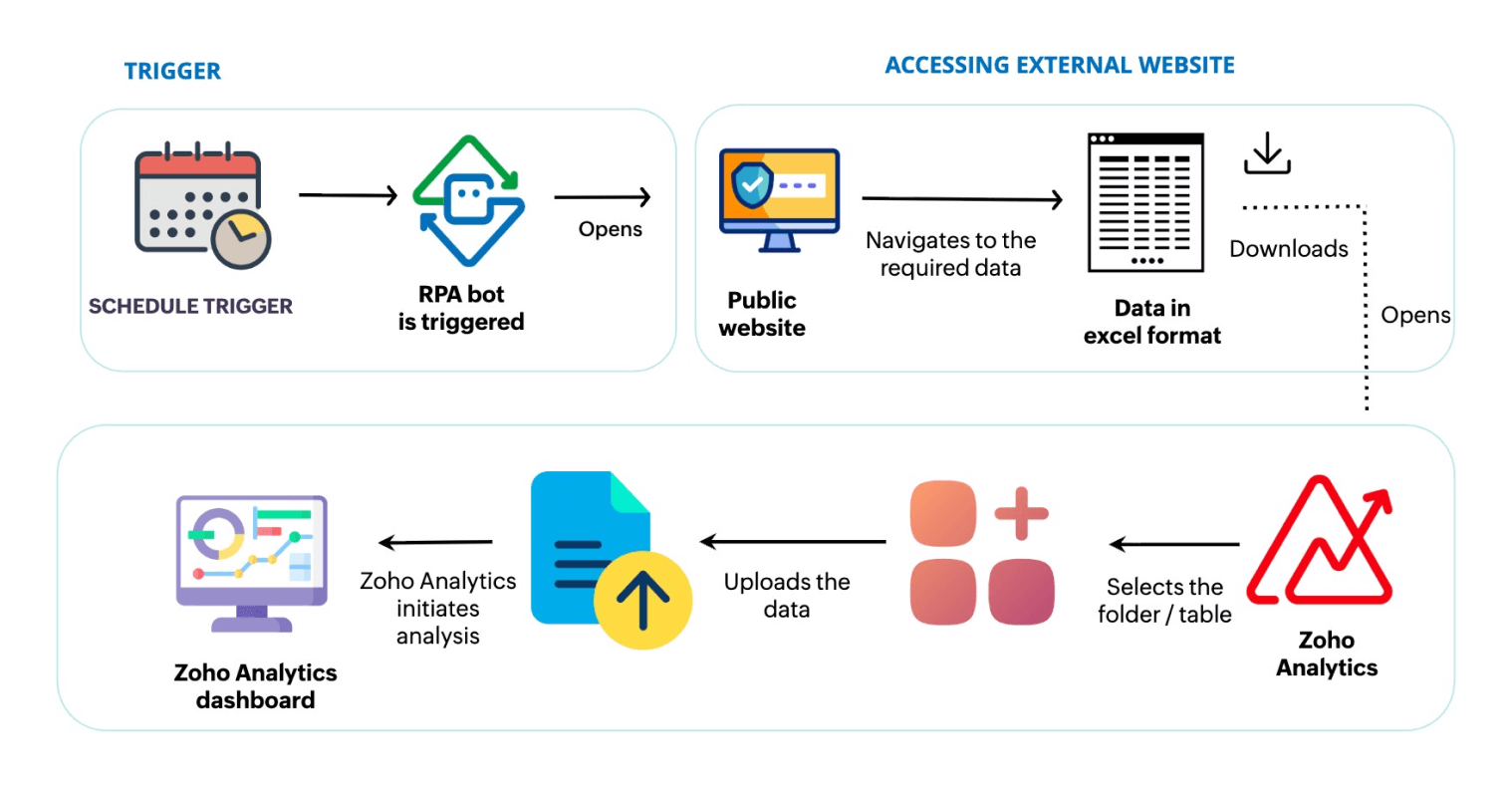
1. Scheduled trigger starts data collection
Zoho RPA runs on a fixed schedule to ensure the latest fund reports are collected at the right frequency, such as daily, weekly, or monthly.
2. RPA navigates to the public ETF portal
The bot opens the public website and navigates to the specific fund or report page, following the same steps a user would take.
3. RPA downloads and retrieves the dataset
Zoho RPA clicks the Download button to fetch the latest CSV or Excel report and stores it in a predefined location.
4. RPA ensures validation and naming standardization
The bot applies standard naming conventions (fund name, date, report type), and prepares the file for ingestion.
5. RPA automatically uploads to Zoho Analytics
Zoho RPA uploads the dataset into the correct Zoho Analytics workspace and table, appending or replacing records as required.
6. Dashboard refreshes and new data is available
Once the upload completes, Zoho Analytics refreshes dashboards so teams always see the most recent fund data.
What changed with Zoho RPA
| Before RPA | After RPA |
| Experts manually download data from external public sites | Zoho RPA retrieves public data automatically on a schedule or event |
| Data refresh depends on individual availability and follow-ups | Data collection runs reliably without human dependency |
| Files are uploaded into Zoho Analytics through manual workflows | Zoho RPA uploads data into Zoho Analytics automatically |
| Dashboards update only after manual uploads are completed | Dashboards refresh as soon as new data is ingested |
| Insights remain passive and require manual follow-up actions | Actions can be triggered based on insights and thresholds |
How Zoho RPA empowers analytics and operations teams
- Always-on data pipelines: Reports flow from websites to Zoho Analytics without manual effort.
- Faster insights: Dashboards refresh automatically with the latest data.
- Zero manual dependency: No more logging in, clicking to download, or uploading files.
- Scalable automation: Easily extend the workflow to multiple reports, portals, and data sources.
Ready to automate report collection and analytics updates?
With Zoho RPA, your data pipeline from web portals to Zoho Analytics becomes fully automated, keeping dashboards fresh, reliable, and always up to date.
Want to see how it works?