- HOME
- Billing basics
- Nigeria e-invoicing: APP, billing software, or both?
Nigeria e-invoicing: APP, billing software, or both?
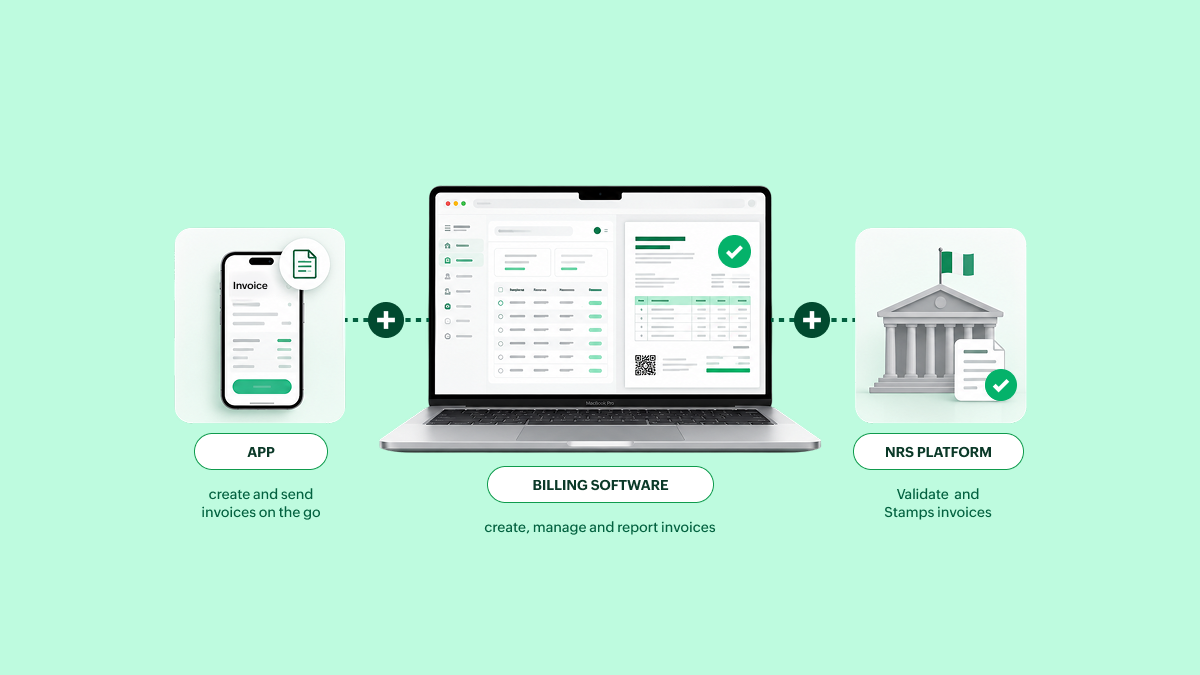
The tax authority in Nigeria — the Nigeria Revenue Services (NRS) — laid the foundation for e-invoicing in 2024, adopting the Peppol 4-corner model as the basis for its framework. The following year focused on testing and stakeholder consultations, with the NRS also extending its onboarding and adoption deadlines for larger taxpayers. By early 2026, attention shifted to post- go-live reviews for larger taxpayers, while also setting the stage for medium taxpayers to go live on 1st July 2026. Compliance enforcement for this group begins in Janurary 2027. Emerging taxpayers are scheduled to adopt the mandate in 2027, with a nation-wide compliance expected in January 2028.
For finance teams, the scenario matured from defining e-invoicing to becoming compliant with the changes.
The journey to becoming compliant is not always simple and often gets muddled as three different aspects are sold under the same e-invoicing banner: a billing software, Access Point Provider (APP) and System Integrator (SI). All these three requirements are layers in a single stack. Knowing which layer you're missing out on is often the quickest way to avoid paying for the wrong one. Here's a ready reference guide to understanding Nigeria's e-invoicing mandate.
For any business in Nigeria, the most straightforward response when it comes to choosing between the two layers — an APP and a billing software — is often to choose both. That said, it doesn't always mean two different vendors. While your billing software creates and manages the invoice, an APP carries it to the NRS. If your billing software already connects to an accredited APP, you have the full stack. If not, you are missing one essential layer.
This article discusses all the important angles of choosing the right solution so your business becomes fully compliant. By the end, you'll understand everything about the e-invoicing mandate in Nigeria and why you may be missing out on making the most of it.
How does the e-invoicing stack fit together?
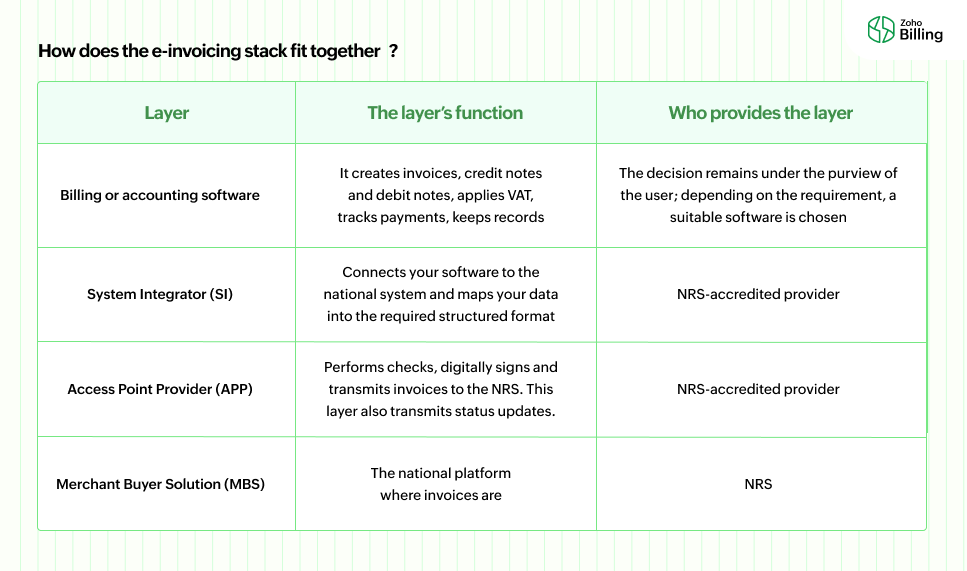
There are essentially three to four layers which make up a major chunk of the e-invoicing process. Every business has to set up the first layer, which is the software used to create invoices. The table below shows how each of these layers stack up and hold. They are mentioned in order, beginning from Layer 1 to Layer 4.
Consider the following scenario to better understand how an invoice moves through the different layers.
A logistics company bills a manufacturing customer ₦ 4,000,000 plus an additional VAT of ₦ 300,000. This invoice is created in the billing software (Layer 1) and then converted into the structured format, signed and validated by an APP (Layer 3), which then pushes it to the NRS MBS portal (Layer 4). The entire transmission is supported on the SI (Layer 2). The result of this process is an Invoice Reference Number (IRN), which is proof of a fully validated invoice.
In the case of B2B businesses, the validation happens before the delivery as the invoices here follow the pre-clearance model. If the validation fails, nothing reaches the customer until someone fixes the data and resubmits. In this example, customers can claim the ₦ 300,000 as input VAT, because the invoice carries a valid IRN. Businesses on the other hand, can only claim the input VAT on invoices validated through the MBS; this is especially true when the turnover is above ₦ 5 billion — or for large taxpayers.
The importance of validating an invoice is essential when customers are left with irrecoverable VAT amounts. On a monthly retainer, like the one in the scenario mentioned above, that's approximately ₦ 3.7 million a year, sitting on their books because of this invalidated invoice.
Layers 1 and 3 — your billing software and your APP, respectively — are the most important out of the four layers that make up any e-invoicing module.
Invoicing starts in the first layer
Your billing software is where all invoices start. It holds your customer records and tax IDs (or TINs), applies the right VAT, and in the end produces the specific transaction in the required format. It also keeps the audit trail once the NRS has responded with an IRN generated after validation.
What Layer 1 cannot do on its own, is send transactions to the NRS directly. This is because most billing software generates transactions as PDFs, which doesn't constitute an e-invoice on its own. It becomes an e-invoice only after it has been submitted in a structured format acceptable by the NRS MBS portal. Furthermore, a connection needs to exist between the billing software and the NRS MBS portal for the information to be safely and properly transmitted. So, unless your software has a built-in connection to an accredited provider, there's always going to be a gap between creating the invoice and getting it validated.
Zoho Billing provides recurring, subscription, usage-based billing, and much more in an easy-to-use format that's fully personalized to your business . Learn more here.
Data transmission happens in the third layer
The APP is the transmission layer that receives structured invoice data, signs it, sends it to the NRS, and relays the result. What it doesn't do, is manage your customers, schedule recurring invoices, follow-up on payments, or reconcile receipts.
This distinction matters, because some providers bundle a basic invoicing tool with their APP service, and such tools seldom fulfill what every business requires from an invoicing or even a billing standpoint. As you may end up paying an inflated price for just an APP integration, this is often not the recommended choice.
If you issue credit notes regularly or collect payments at a high volume, you'll want a robust and a trustworthy billing system holding every process together. In practice, several providers now hold both SI and APP accreditation, so one provider can cover the whole connection.
How do I choose the right setup for my business?
With so many layers at play here, it tends to get a little overwhelming when you're choosing the right setup for your business. The table below talks about daily scenarios, and provides insight into how to go about choosing the right invoicing setup. In this way, you're not just staying compliant, but also ensuring your billing workflows remain unaffected.
As a bonus, the table below also gives you an idea on what to check before locking into a particular option.
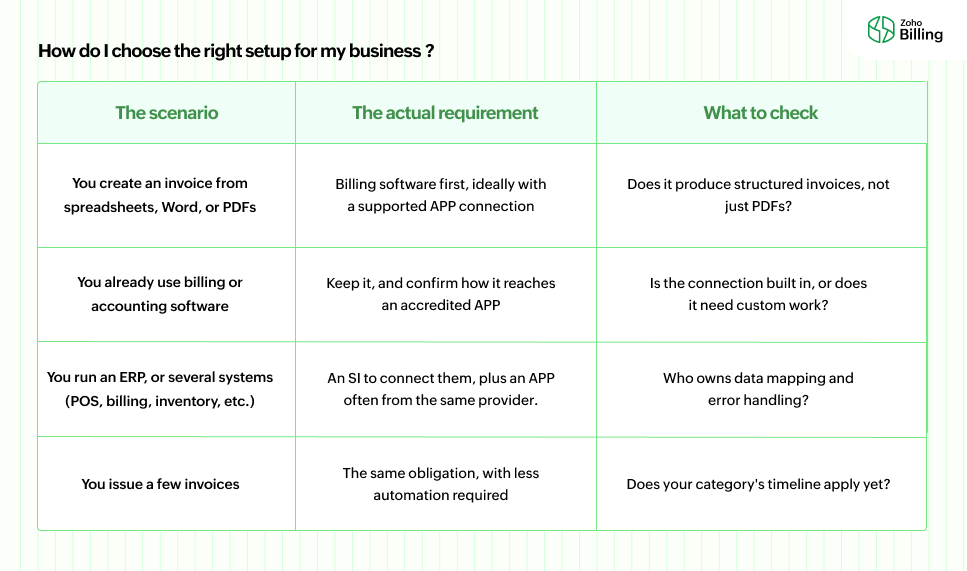
Low volume changes how much automation you need. It doesn't change whether you're in scope. The e-invoicing mandate in Nigeria is expected to cover most VAT-registered businesses as it rolls out.
Simplify your deciding process, make the right choice, and gain an edge over the others. Reach out to our professionals and schedule a demo today.
Six questions to ask before you choose
Now that you know what each layer does and the process of choosing the right setup, here are the questions you need to ask before zeroing in on your preferred solution to handle e-invoicing norms.
- Is the provider accredited?
Reason: The NRS publishes a service provider's directory at mbs.gov.ng where you can verify accredited providers before signing. A rule of thumb is to treat any "NRS-approved" claim as unverified until you've checked it there.
- How does my software connect?
Reason: A native connection is disparate from a custom integration that someone has to build and maintain. Knowing this ensures you're aware of where your money goes.
- Who handles rejections?
Reason: Invoices can be rejected for missing details or incorrect tax values. Knowing who fixes them significantly improves resolution time and error tracking.
- Can it handle credit and debit notes?
Reason: Every time a validated invoice is locked, edits have to be created as either credit or debit notes. Knowing if your process accommodates these documents is essential for invoice rectifications and, ultimately, for customer retention.
- What does the full cost look like?
Reason: Software, integration, and transmission may be priced separately. So, always ask for the total cost and not just that of one line item.
- Will the setup keep up as rules evolve?
Reason: The e-invoicing mandate has been built in a manner flexible for all businesses to eventually become fully compliant. Naturally, the rollout continues into 2028, so your setup should adopt the changes and be compliant even after this period.
Common pitfalls to avoid
The next item on the checklist to making the most of this mandate is to learn about all the common pitfalls so you don't paint yourself into a corner.
- Buying an APP to fix a process problem:
This is perhaps a very common point that most businesses tend to gloss over because a proper root-cause analysis of a potential process issue was never done. If the core invoicing process houses a fundamental issue, then buying an APP solely doesn't fix the problem and this stands out when invoices are created by hand.
- Taking accreditation claims at face value:
The smartest move is to always consider that all "NRS-approved" claims are false, until a check on the official website's service providers' directory is done. Validity and accreditation are two very important factors in determining if the transaction documents submitted by any business is authentic and false claims can lead to severe penalties.
- Splitting the stack with no one owning the errors:
Imagine a scenario where the billing software, the SI, and the APP all come from three different vendors. One rejected invoice can bounce between all of them because nobody is willing to take ownership of the errors caused. Deciding the responsible party smoothens the entire workflow and prevents the process from stalling.
- Waiting for your own enforcement date:
This pitfall is common amongst the emerging taxpayers —below ₦1 billion — who go live on 1 July 2027, but only enforced from January 2028. Integration, testing, and personnel training usually take longer than they look on paper, so it's never a wise decision to wait for your enforcement date.
Where does Zoho Billing fit?
Zoho Billing is the first layer (or the software layer) in this stack. It provides you with everything your business needs to set up your daily billing workflows and goes beyond the most common billing and invoicing features by giving you full control on how to run your business.
Explore what Zoho Billing has in store for Nigeria.
Zoho Billing bypasses the issue of having multiple vendors for different layers by connecting to the NRS e-invoicing portal through Remita — an NRS-accredited APP — so you can push invoices, credit notes, and debit notes without leaving the tool. Each transaction shows its e-invoice status, from "Yet to be Pushed" to "Pushed." If validation fails, the error details appear so you can correct the data and resubmit. Validated transactions are locked as per rules so all corrections are made either through a credit or a debit note.
In short, Zoho Billing is not an APP on its own, but Remita is. What you get is the billing software and a built-in connection to an accredited APP, all in one billing workflow.
Your business automatically becomes e-invoicing compliant with Zoho Billing, a mandate-ready billing software.
Frequently asked questions
- Is an APP the same as an SI?
No. While an SI connects your software to the national system and prepares your data, an APP securely transmits invoices to the NRS. There are instances where many software providers offer both.
- Can I connect directly to the NRS without an APP or SI?
Yes. While it is possible for businesses to connect to the NRS directly without an APP or an SI, most businesses don't because the core network architecture cannot be bypassed entirely. So, businesses connect, instead, through accredited providers. Check the NRS guidance for your taxpayer category before deciding.
- Does a PDF invoice count as an e-invoice?
No. Although the PDF is a digital document, it is considered unstructured and the NRS MBS portal only accepts fully formatted and structured documents. Globally, a true electronic invoice is always structured and exists either in XML or JSON format. This is to make them machine-readable and prevent manual entries.
- What happens when I need to correct a validated invoice?
As soon as an invoice is validated, it is "legally locked" and cannot be edited. In other words, the moment the IRN is generated, the invoice can no longer be altered, either manually or digitally. The only way to edit an invoice that has already been validated is through issuing either a credit or a debit note. The good news is that you can issue a credit or a debit note in seconds with Zoho Billing, making switching to a fully e-invoicing-compliant billing software ideal.
- Do I need new software if I already have accounting software?
Not necessarily. E-invoicing in Nigeria mandates that all digital copies of transactions are created and passed through a software that can produce structured invoices and reach an accredited APP. Ensuring this is often the most important step to being compliant. If your accounting software cannot reach an accredited APP, then that's when you begin considering switching to another provider. Consider our mandate-ready Zoho Books to answer all your broader accounting needs.