- HOME
- Pricing mechanisms and Strategies
- A detailed guide on popular pricing models
A detailed guide on popular pricing models
If you squint a little, a grain trader in an ancient marketplace selling by the sack and a software company selling seats by the month, are doing the same thing. Both are putting a number on its value, arrived by the costs involved in bringing its product to the customer + profits, one slightly more complex than the other. The variability in these factors gave rise to what we call "pricing models" today.
What keeps the models alive, and what keeps giving birth to new ones, is a change in one of these two factors:
What customers expect, and how they behave when they buy
The very nature of the good or service, and the way its value reaches the customer
With movement in either of the areas, pricing has to follow. This is why keeping yourself updated on the latest changes is important; your business needs to react to these changes quickly to retain the market share. We are watching this play out with AI right now, where the long standing per-seat pricing model was tested. For example, McKinsey notes that the number of software companies using consumption-based pricing more than doubled between 2015 and 2024, which gives you a sense of how quickly the second factor has been changing.
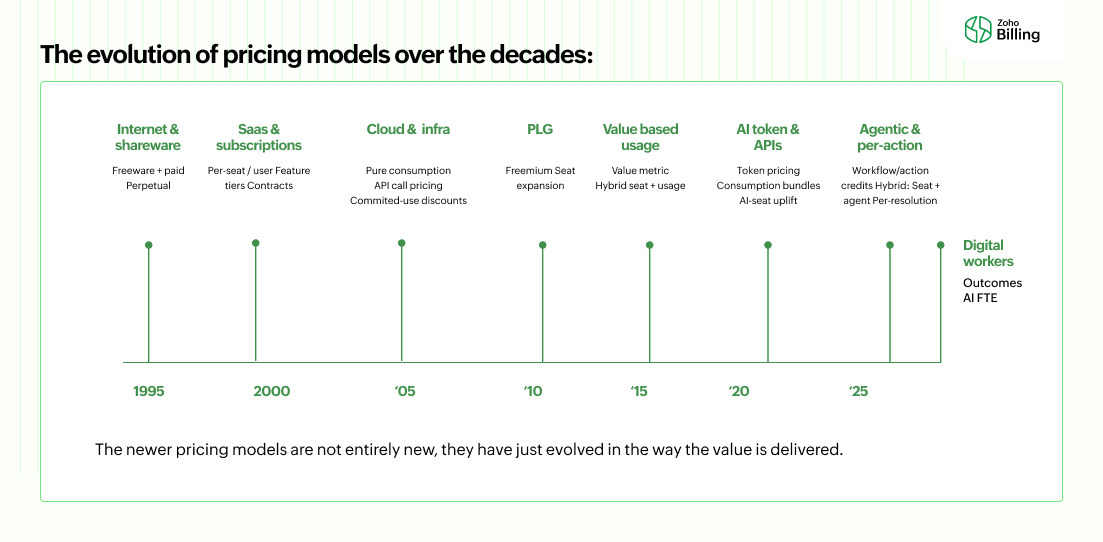
The evolution of pricing models from the perspective of the tech world | From the webinar "Pricing SaaS in the age of AI"
This guide walks through the popular models today, how it works, where it's strained, and when it fits, so you can weigh which one matches how your customers get value from you.
What is flat-rate pricing?
Flat-rate pricing charges one fixed price for a product, service, or subscription and cares neither about how much the customer uses it nor about how many scope changes come in. It is one of the simplest pricing models and for the right offering, it can be operationally and financially effective.
Where you can see this in action
Pure flat-rate pricing is not that common in software today, mostly because the offerings have grown too complex to fit into a single number. But it still can be found in consumer subscriptions, where keeping the decision simple is part of the appeal. Apple TV is a good example. It has one standalone plan and every subscriber pays that same price for the full catalog. The only decision left for the customer is whether to subscribe or not, as simple as that.
How do you operationalize flat-rate pricing?
Thanks to its simplicity, a spreadsheet can hold up when you only have a few products and a few customers to manage, but only for a limited time. As the months stack up, historical data gets harder to reach, and migrating it all into a proper system later becomes a headache of its own. So no matter how simple it looks, it does pay to have a system in place early that covers at least the following:
A product catalog listing every product or service with its flat price
Recurring invoices that go out automatically every billing cycle (if you have a subscription model)
Options like dunning and reminders to speed up collections
Revenue recognition that spreads the fee across the time period it covers
Pros of flat-rate pricing
Simple operations from setting the price to invoicing and recognizing the revenue
High revenue predictability when it is billed on a recurring basis
Clarity and transparency for customers, so they know the bill before it arrives
Cons of flat-rate pricing
More rigid and may not suit anything that involves variables such as usage, seats, or volume
Heavy users pay the same as light ones, leaving money on the table
Expansion revenue depends on price increases or new products, as the bill does not grow alongside the customer
What is unit-based pricing?
Unit-based pricing, often called per-unit pricing, charges a fixed rate for every unit a customer buys, so the total climbs linearly with quantity. It is another primitive model, yet one of the most versatile to exist. Right from buying apples by the pound to buying software licenses by the seat, unit-based pricing has helped businesses establish a baseline price while also handling simple variables.
Per-seat SaaS is the version most of us know today, and Bain points out that it lasted because headcount was a decent proxy for value, and it was easy to understand, forecast and budget around. As we are witnessing now, that proxy is now wobbling, because an AI agent can finish a task with no human seat attached to it at all.
Where you can see this in action
Per-seat, per-month software licensing is the textbook case. It could be a user, or an organization depending on what it serves primarily. For an example, look no farther than Zoho Billing's pricing plans, they are charged per organization, with further limits on capabilities provided.
How do you operationalize unit-based pricing?
Unit pricing stays simple right up until the quantity starts changing in the middle of a billing cycle, which in SaaS is most of the time. A system that handles it well should cover:
Every basic thing mentioned in flat-rate
Quantity changes mid-cycle need to be handled well with proration (in subscription cases)
Pros of unit-based pricing
It works best when one unit maps cleanly to the value a customer receives, as with a license, a device, or a delivered item. Customers can work out their own bill in their head, and your revenue grows as they grow.
Cons of unit-based pricing
- There is no built-in reward for buying more, so large customers push for discounts that get negotiated deal by deal.
When the unit stops tracking value, as seats are beginning to with AI, the model starts charging for something the customer no longer cares about. If you sell by the seat today, it might be a good moment to ask how many of your customers' tasks will still need a seat two years from now.
What is tiered pricing?
From here on, we start looking at the models that came about when a single rate couldn't keep up with how differently customers used a product. Tiered pricing splits quantity into slabs and charges each slab at its own rate, then adds the slabs together for the total. It can either be increased or decreased depending on the business model.
Its roots go back to utilities, which wanted to profit from higher consumption without charging one rate per unit, so the first block of electricity was billed at one rate and every block after it at another.
Software borrowed the idea and often turned it around, lowering the rate as usage climbs instead of raising it. Say an API product prices its calls like this:
The first 1,000 calls at $0.10 each
Calls 1,001 to 5,000 at $0.08 each
Every call beyond 5,000 at $0.05 each
A customer who makes 6,000 calls in a month pays $100 for the first slab, $320 for the second, and $50 for the third, which brings the bill to $470.
In everyday SaaS conversation, "tiers" also means packaged plans such as Basic and Premium, which some billing systems call stair-step pricing to keep the two apart.
Where you can see this in action
Cloud storage is a common case. Amazon S3 prices storage in slabs, with one rate for the first 50 TB stored in a month and lower rates for the slabs above it, so a large customer's bill is a sum of several rates.
Many electricity and water utilities, where the model began, still bill households the same way.
How do you operationalize tiered pricing?
The arithmetic is where tiered pricing gets heavy, and that's exactly why an automated system should handle it. It should include:
Usage tracking that captures every unit consumed in the billing period
A pricing engine that applies each slab's rate and adds the slabs up automatically
Invoices that break the total down slab by slab
A usage view or alerts for customers, so crossing into the next slab isn't a surprise at the cycle's end
Pros of tiered pricing
By its very nature, it creates room for upselling without much effort, since every slab or plan has a natural next step.
Despite its bundled look, it handles highly variable offerings well and can be very profitable if it is structured well.
Cons of tiered pricing
- Customers find the bill harder to predict, so invoices need to show each slab.
- Badly placed slab boundaries create odd incentives, and getting them right without any benchmark data can be hard.
- It needs accurate usage tracking, which is an extra moving part compared with flat or per-unit pricing.
What is stair-step pricing?
Stair-step pricing offers a set of fixed-price packages, each covering a range of usage or a set of limits, and the customer pays the price of whichever step they fall into. Unlike tiered pricing, nothing gets added up across slabs, so the customer is either on one step or on the one above it.
It gives the customer a predictable bill while giving you room to shape each package around the job your customer is trying to get done.
Where you can see this in action
Basecamp works this way below its unlimited plan, with packages at $29, $79, and $99 a month that each allow a set number of projects and users. A team that adds a 16th user moves up a step and the bill moves too.
How do you operationalize stair-step pricing?
Customers move between steps far more often than they change a flat plan, so most of the work lies in handling those moves cleanly. A system for it should cover:
Plans in the catalog, each with its price, limits, and included features
Proration for upgrades and downgrades
Checks against plan limits, so you know when a customer has outgrown their step
Pros of stair-step pricing
A predictable bill for the customer and predictable revenue for you
A clear upgrade path, which hands sales a natural conversation whenever a customer nears a limit
Cons of stair-step pricing
The move may feel sharp for customers who have requirements that are slightly above their current plan. One extra user or project and they are burdened with more features and charges than they need. A customer at the bottom of a wide step pays for capacity they are nowhere near using.
What is volume-based pricing, and how is it different from tiered pricing?
Volume-based pricing also uses brackets, but with one important difference. Once the total quantity reaches a defined bracket, every unit gets that bracket's rate, including the ones bought before the threshold. It suits businesses that genuinely benefit from larger orders and can absorb a discount when a purchase happens at scale, such as wholesalers or infrastructure providers whose cost per unit falls with volume.
Let's keep the same brackets as the API example above, so the difference is obvious:
1,000 calls at $0.10
1,001 to 5,000 calls at $0.08
Greater than 5,000 at $0.05 each
Calls in the month | Per-unit at $0.10 | Tiered | Volume-based |
900 | $90 | $90 | $90 |
3,000 | $300 | $260 | $240 |
6,000 | $600 | $470 | $300 |
Volume pricing is generous to the big buyer by design, but it has a cliff at the ranges' edges. A customer at 1,000 calls pays $100, while a customer at 1,001 calls pays $80.08, because all of their calls drop to the lower rate at once. Customers who notice this will happily buy a few extra units to cross the line, which is fine if you planned for it and a small leak if you did not.
Where you can see this in action
Uline, a packaging supplier, is a good place to see volume pricing at work. Each box in its catalog, such as this 12 x 12 x 10" corrugated box, comes with a price table that breaks at 25, 100, 250, 500, and 1,000+ boxes. Once an order crosses one of those thresholds, every box in it is billed at the lower rate, and not only the boxes above the line. A business ordering 500 boxes pays the 500-box price on all 500, which is what makes it worth rounding an order up when it lands just short of the next break.
How do you operationalize volume-based pricing?
A system for it should cover:
Brackets defined in the catalog, with the rate for each
A pricing engine that applies the bracket's rate to the whole quantity on the invoice
Reports that show how many customers cluster just above each threshold
Approval rules for sales, so negotiated volume deals do not drift below the published brackets, as there is a risk for margin loss at too abnormally high a scale
Pros of volume-based pricing
A strong reason for customers to buy more in one go, which lifts revenue per customer
Pulls customers towards larger commitments
One rate on the invoice, which keeps the bill easy to read
Cons of volume-based pricing
Revenue falls sharply when a large customer crosses into a lower bracket
Your margins have to survive the discount applying to the whole order rather than only the units above the threshold
What is credits-based pricing?
This is a model that rose steeply in the market due to AI, but it's not a new one in the tech world. Credits-based pricing gives the customer a pool of credits, bought upfront or included with a plan, and draws it down as they use different features, with each action costing a set number of credits.
This model gets granular when charging for the value delivered. It solves a problem the earlier models struggle with, which is how to charge fairly when one customer leans on a cheap feature all day and another uses an expensive one twice a week.
Where you can see this in action
AI products have taken to this model in a big way. In its August 2026 analysis, Bain found that about four out of every five vendors introducing AI pricing are choosing capacity models, where customers commit to a fixed amount and do not get a refund for what they leave unused. Our customers Jio Haptik, Clodura, and others are operating this way.
What kinds of credit models are emerging with AI?
With AI solutions on the rise, credits are being tied to different things, and each version is earning its own name.
Model | What one credit pays for | Where can it be seen |
Input-based (effort) | Resources the AI consumes, such as tokens, compute, or agent hours | Developer platforms, AI APIs, and coding assistants (for example, OpenAI and Anthropic APIs billed per token) |
Output-based | What the AI produces, such as a drafted summary, an updated record, or a recommended lead | CRM, sales, and marketing tools |
Outcome-based | A business result, such as a resolved support ticket or recovered fraud | Customer support, fraud prevention, and collections |
The line between output and outcome is thin. A recommended lead is an output, while a qualified lead is an outcome.
How do you operationalize credits-based pricing?
Credits are easy to sell but are also easy to mismanage operationally. There are lots of variables involved, lots of pricing rules, and different usage cases. A system for it should cover:
A credit value for every action or feature, kept in one place so it can be updated
Usage tracking that deducts credits as they are consumed
A visible balance, burn rate, and low-balance alerts for customers
Top-ups, rollovers, and expiration rules applied automatically
Revenue recognition that keeps prepaid credits as deferred revenue until they are consumed or expire
Pros of credits-based pricing
One currency across many features keeps the price list short even as the product grows.
Prepaid credits solve revenue predictability that comes with other usage billing models.
A fixed commitment is easier for a customer's finance team to approve than an open-ended bill.
Cons of credits-based pricing
Customers who cannot see their balance find out about it when work stops, usually through a support ticket.
Deciding how many credits each action costs is hard, and changing it later feels like a price increase to the customer.
Expiration and rollover rules need to be agreed upon between billing and finance before the first credit is sold.
What is ramp pricing?
Ramp pricing concerns time, rather than usage. It changes the price over the life of a contract, usually starting lower and stepping up at agreed points during the contract year. Let's say a customer signs a three-year contract that bills $60,000 in the first year, $80,000 in the second, and $100,000 in the third, matching the pace of its rollout. The customer is not paying for the whole company on day one, and the vendor locks in growth that would otherwise hang on a renewal conversation two years down the line.
Ramp pricing is less a model of its own than a time dimension you can lay over the others. The ramp might be in seats, in a flat platform fee, or in a committed amount of credits, which is why it often appears inside hybrid deals.
Where you can see this in action
You will seldom find ramp pricing on a public pricing page, because it is negotiated contract by contract. It shows up most in multi-year enterprise software agreements, where a customer rolls a product out to one department first and the rest of the company later, and no one wants to pay full price for licenses that will not be used for months.
How do you operationalize ramp pricing?
The billing side needs to change the amount automatically on the right date, every year of the contract, without someone keeping a reminder in their calendar. The finance side is harder. Under revenue standards such as ASC 606, when a customer receives the same service every year, revenue may need to be recognized on a different pattern from what is invoiced, so the books and the invoices drift apart in the early years. A system for it should cover:
Dated price schedules stored against each contract
Automatic price changes on the agreed upon dates
Quotes that show every year's price upfront, so the customer signs knowing the full schedule
Revenue recognition that tracks the gap between what is billed and what is recognized
Pros of ramp pricing
It lowers the barrier to a large deal, since the customer does not pay for full adoption on day one
Expansion revenue is locked in at signing instead of being left to a renewal
The price follows actual adoption, which makes the deal easier to defend internally on the customer's side
Cons of ramp pricing
Billed amounts and recognized revenue can drift apart in the early years, which needs careful handling by finance
Every contract carries its own schedule, which spreadsheets handle badly once there are more than a few
If adoption stalls, the customer may push back on the later steps
What is hybrid pricing, and why are so many companies moving to it?
Hybrid pricing is one of the most commonly used models today, and it is just a clever combination of the models above. A business keeps a predictable base, such as a flat platform fee or a per-seat charge, and layers a variable part on top, such as usage, credits or an overage rate. The base protects recurring revenue while the variable part captures what heavy users get out of the product.
Where you can see this in action
The AI wave has made this the default middle path for established software companies. When Bain studied more than 30 SaaS vendors adding generative AI to their products, it found that about 65% had layered an AI meter on top of seat-based pricing, with Adobe and Salesforce among them, while the remaining 35% had simply raised seat prices and bundled AI into existing tiers. None of them had moved fully to usage or outcome-based pricing.
How do you operationalize hybrid pricing?
The flexibility that makes hybrid attractive to customers is the same thing that makes it heavy for the teams behind it. One invoice has to reflect a prorated seat change, a monthly platform fee, a credit top-up, and an overage line. Revenue recognition is another complexity. A system for it should cover:
A catalog that holds fixed, per-unit, tiered, and usage components under a single plan
Metering for the variable parts, tied to the same customer record as the base
One invoice that brings every component together, with proration where needed
Revenue recognition that treats each component on its own schedule
This is where the billing system starts to matter more than the pricing idea itself. If your catalog already supports base types, testing a hybrid plan becomes nothing more than a configuration task.
Pros of hybrid pricing
A predictable base with room for upside from heavy users
New meters, such as AI usage, can be added without rebuilding pricing from scratch
Customers can adopt the variable part at their own pace
Cons of hybrid pricing
Invoices get busier, and customers may need help reading them
Billing and revenue recognition carry a heavier operational load
It is harder to explain on a pricing page than any single model
How do you choose the right pricing model?
The simplest way is to ask how the value your customer receives changes as they use more of your product, and then follow the answers down. If value does not grow with use, flat-rate keeps things simple. If it grows, then take your profit margins, what benefits you (high volume purchases, monetizing power users, and the like), and which offers the most "visible" and "understandable" value for your customer into accountability.
Implement your pricing model with Zoho Billing
If there is one thread running through every model in this guide, it is that pricing follows value, and value keeps changing shape. The grain trader and the AI company are answering the same question with very different units, and the model you pick today will need a second look once customers use your product in ways you didn't plan for.
To ensure smooth operations, a well-automated system is essential. Zoho Billing supports flat, volume, tiered, metering, and credits-based pricing, with support for add-ons that lets you easily handle hybrid plans. With revenue recognition built in along with its extensive reporting capabilities, it helps you manage your entire billing operations end to end. If you are weighing a move to a new model or just looking to improve operations for your current model, you can book a conversation with our team and they can walk you through how Zoho Billing helps manage operations for your pricing model.
Frequently Asked Questions
It combines a predictable base, usually a platform fee or per-seat charge, with a variable AI component such as credits, usage, or overages. Most established SaaS companies adding AI have taken this route because it lets them charge for AI without rebuilding their pricing from scratch.
Yes, but most businesses either keep existing customers on their current price for a set period or move them over at renewal, with clear notice of what will change. Running both models side by side for a while also gives you real data on whether the new one performs better before you commit.
Start from your actual usage data and place boundaries where customer behavior naturally clusters, so most customers fall comfortably inside a bracket instead of hovering at its edge. With volume pricing, also check what happens to revenue just past each threshold, since that is where the cliff effect shows up.
That depends on your terms, which should state clearly whether credits expire, roll over, or can be topped up. Under capacity models, unused credits usually expire without a refund, and finance has to account for that unused balance when recognizing revenue, so the policy needs to be agreed upon between billing and finance upfront.