
1099-K Forms
1099-K Form is an informative report that details business payments received via payment gateways such as Zoho Payments. It is filed with the Internal Revenue Service (IRS) and applicable state authorities when state requirements are met. The form includes all card and third-party network transactions processed during the reporting year (January 1 to December 31).
Eligibility for 1099-K Form
At the federal level, this generally applies if you’ve processed more than $20,000 in gross payments and over 200 transactions during the reporting year. Some states, including those participating in the CFSF program, may require filing even if federal thresholds are not met.
Insight: You may receive more than one 1099-K Form if you updated your EIN or SSN during the year, or if transactions were processed through multiple payment gateways, as each gateway is required to file a separate 1099-K Form.
How 1099-K amounts are calculated and reported
The 1099-K Form reports business payments based on when the funds are available, not when the transaction occurs. To understand how the amounts are calculated:
- Transaction Time: The moment the customer makes the payment.
- Available On (T+1, T+2, or Instant Payout): The date when the payment is eligible for payout. This can be in T+1 or 2 business days, or the same day if it’s an instant payout.
- Funds Available On (T+2): The date when the money is deposited into the merchant’s account. For example, your payment was made available after T+2 business days.
Based on this, at the end of the year, only payments whose funds were deposited into the merchant’s account within the reporting year are included in the 1099-K Form. Any payments that are deposited in the following year are reported in the next year’s 1099-K Form.
Scenario:
Let’s assume David runs a small online store and receives payments through Zoho Payments during 2024. A customer makes a payment of $450 USD on December 30, 2024, and the funds are deposited into David’s account on January 2, 2025 (T+2 business days).
Since the 1099-K Form is calculated based on when funds are available, only payments deposited within the reporting year are included. As this payment was deposited in the following year, it is excluded from David’s 2024 1099-K Form and will be reported in the next year’s 1099-K instead.
View 1099-K Form
In your 1099-K Form, you’ll find a summary of all transactions, such as the gross amount of payments received, the number of transactions, and the total number of cards used for payments.
To view the 1099-K Form:
- Go to Reports.
- Select 1099-K Forms from Taxes and Statutory Compliance.
- Click Download to view the filed 1099-K Form.
- Click Export Associated Transactions to review all reported transactions.
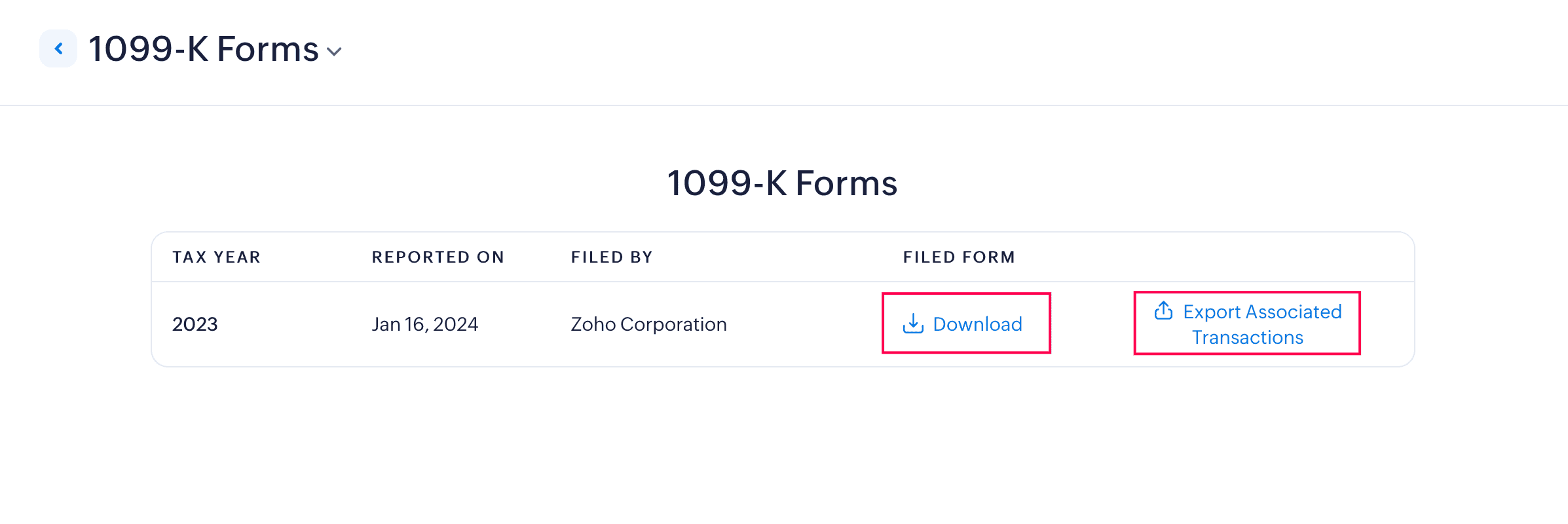
Zoho Payments notifies you when a 1099-K Form is filed and allows businesses to download it from the app as per the Terms for Electronic Delivery of 1099-K Form .
Form 1099-K Details
The 1099-K form will include the information provided below:
| Box Name | Description |
|---|---|
| Filer’s Information | Information of the filer, in this case, Zoho Payments. |
| Filer Checkboxes | Zoho Payments checks these boxes to indicate whether it is a Payment Settlement Entity or Electronic Payment Facilitator and whether the transactions reported are via payment cards or a third-party network. |
| Payee Information | Your business information. |
| PSE’S Name and Phone Number | Contact details of the Payment Settlement Entity reporting the transactions. |
| Account Number | Merchant account number provided by Zoho Payments. |
| Filer’s Tax Information | Zoho Payments' Tax Identification Number provided by the US government. |
| Payee’s Tax Information | The recipient’s Taxpayer Identification Number (TIN). This can be a Social Security Number (SSN), Employer Identification Number (EIN), or Individual Taxpayer Identification Number (ITIN). |
| Payment Information | Box 1a: Gross amount of transactions processed through Zoho Payments. Box 1b: Card not present transactions. Box 2: Merchant Category Code (MCC) is a four-digit code assigned to you based on your business type. Box 3: Number of payment transactions (if applicable). |
| Federal Income Tax Withheld | Box 4: Any federal income tax withheld from the payments. |
| Monthly Breakdown | Boxes 5a-5l: Monthly breakdown of gross payment amounts. |
| State Filing Information | Boxes 6-8: Details of any state income tax withheld and state’s identification number. |
Note: If there are changes in the payee or payment information in the form, write to support@zohopay.com for further assistance.
Insight: Zoho Payments files Form 1099-K, reporting total payments to federal and state agencies, as well as to CFSF participating states. Learn more about the state-wise requirements for filing the 1099-K Form.

 Walkthrough of Zoho Payments personalized to your business needs