- HOME
- Product updates
- Office Use Only: A private corner of your form, just for your team
Office Use Only: A private corner of your form, just for your team
- Last Updated : November 6, 2026
- 504 Views
- 3 Min Read
Every paper form has that little box at the bottom marked "For office use only". Respondents skip it and your team fills it in later. It's where the real work gets recorded.
Online forms never had one.
Where do the internal notes go?
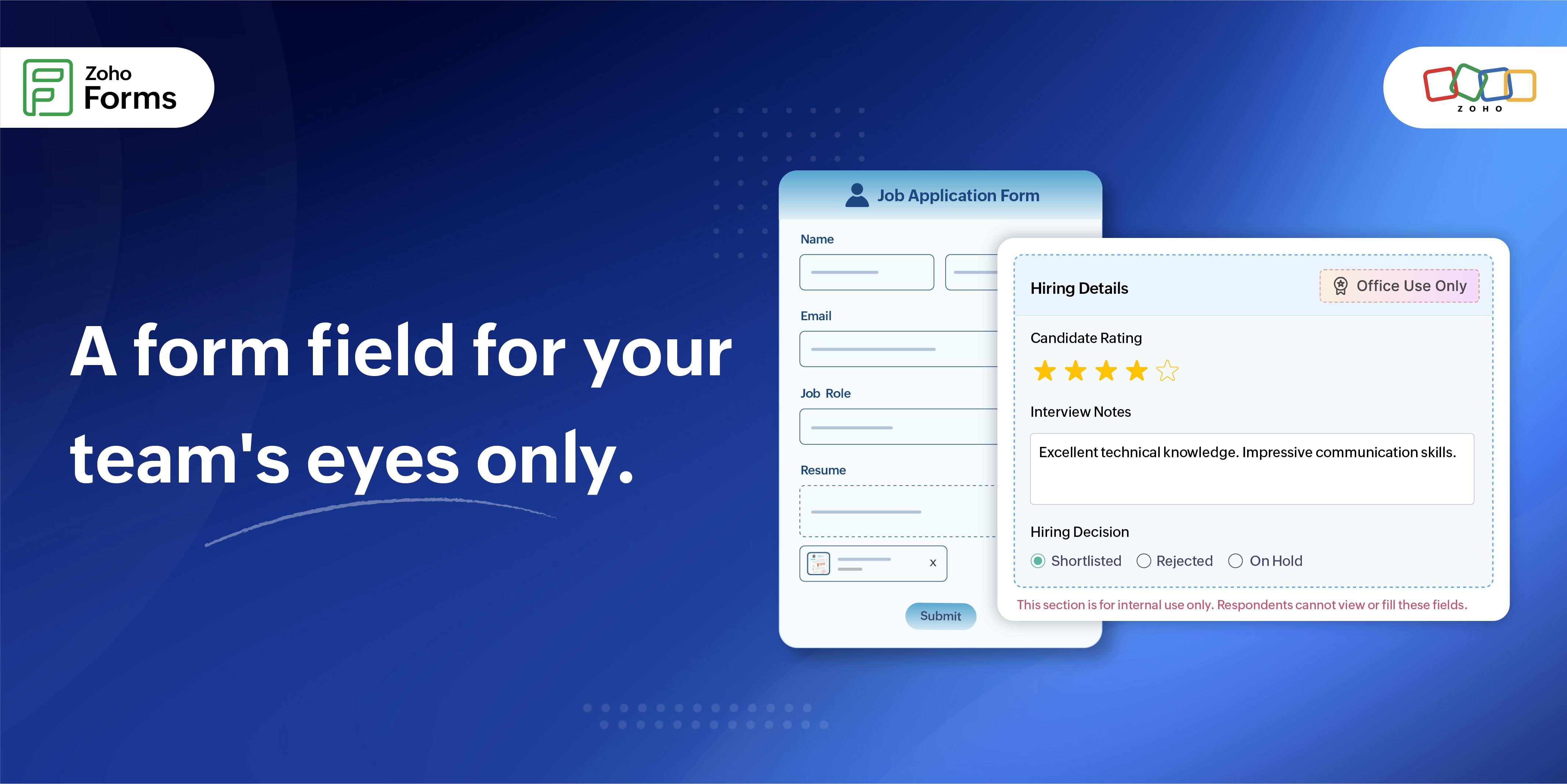
Take a job application form, for example. Candidates share their name, email, role and resume. Then the interviews begin, and the HR team has a rating to give, notes to keep and a hiring decision to make. None of that belongs on the form candidates fill in.
So it ends up scattered across spreadsheets, chat threads and notebooks, far from the application it's about.
What the team needs is a spot on the same record that the candidate never sees.
Which is why Zoho Forms now introduces the new Office Only field.
What is it?
Office Use Only is a new field in Zoho Forms. Drop it on your form and you get a section, a container you fill with other fields by dragging them in from the fields panel, the same way you'd fill a grid.
Neither the section nor anything inside it ever reaches a respondent. Not on the live form. Not in Save & Resume. Not in Edit Response. It's there only for admins and internal staff, and nobody else.
How it works
Let's take the same job application form. The HR manager adds an Office Use Only field to the form and places 3 fields inside: Candidate Rating, Interview Notes and Hiring Decision.
A candidate opens the form and sees Name, Email, Job Role and Resume. That's all. They submit, and the section never shows up.
After that, the HR manager opens the entry from the All Entries section of the form and clicks Edit Record. The Office Use Only Section appears in the record, and anyone on the HR team with edit access to entries can fill in the rating, the notes and the decision against that candidate's form submission.
The section goes wherever the record goes
Hiring isn't one person's job. It takes multiple rounds for the candidate to clear and multiple managers to approve the candidate. Anyone with the right permissions can view or edit the record as the candidate moves through the interview stages.
Say a candidate's record reaches an interviewer as a task. When the interviewer opens it, the Office Use Only section appears and they can fill in the candidate rating right there.
Next, the record reaches a hiring manager as an approval. When they open it, the section appears and they can add the hiring decision as part of the review.
Either way, nobody has to leave the record to find the section. It comes along with it.
Why not just use Tasks or Approvals?
Fair question. Tasks and Approvals are workflows: they kick in after a submission, with assignees, stages and defined actions.
Office Use Only field isn't a workflow at all. It's simply there, on every record, for anyone with the right permissions in All Entries, Reports, Task Entries or Approval Entries. No trigger needed.
Use a workflow when work has to move from person to person. Use Office Use Only when your team just needs somewhere private to write things down.
 Samhita V
Samhita is a seasoned product expert at Zoho Forms who blends deep product expertise and user education to help businesses make sense of powerful features without the jargon. Known for her thoughtful storytelling and crisp communication, she adds a subtle creative flair to every piece she writes. With a knack for spotting real-world use cases and adding a touch of fun to her narratives, she’s on a mission to make even the most complex workflows feel approachable. Beyond the desk, she channels her creativity into dance and mural art, finding new ways to infuse her surroundings with color, rhythm, and meaning.