- HOME
- Product updates
- More than a form. Meet the new Quiz Forms!
More than a form. Meet the new Quiz Forms!
- Last Updated : November 17, 2026
- 342 Views
- 3 Min Read
"I need a quick assessment for new employees."
"Can I create a certification test for my students?"
"How do I conduct an online exam without manually checking every response?"
We have been hearing a lot of questions along these lines from users. That's exactly why we've come up with Quiz Forms in Zoho Forms. Because for years, forms have been great at collecting information. But quizzes are different.
Why regular forms aren't enough
Let's assume I am running a certification program.
I need to:
- Ask multiple types of questions
- Assign marks
- Set a passing score
- Limit the duration
- Prevent participants from memorizing the question order
- See who scored the highest
- Understand which questions most people struggled with
A traditional form can collect responses but cannot do all the above.
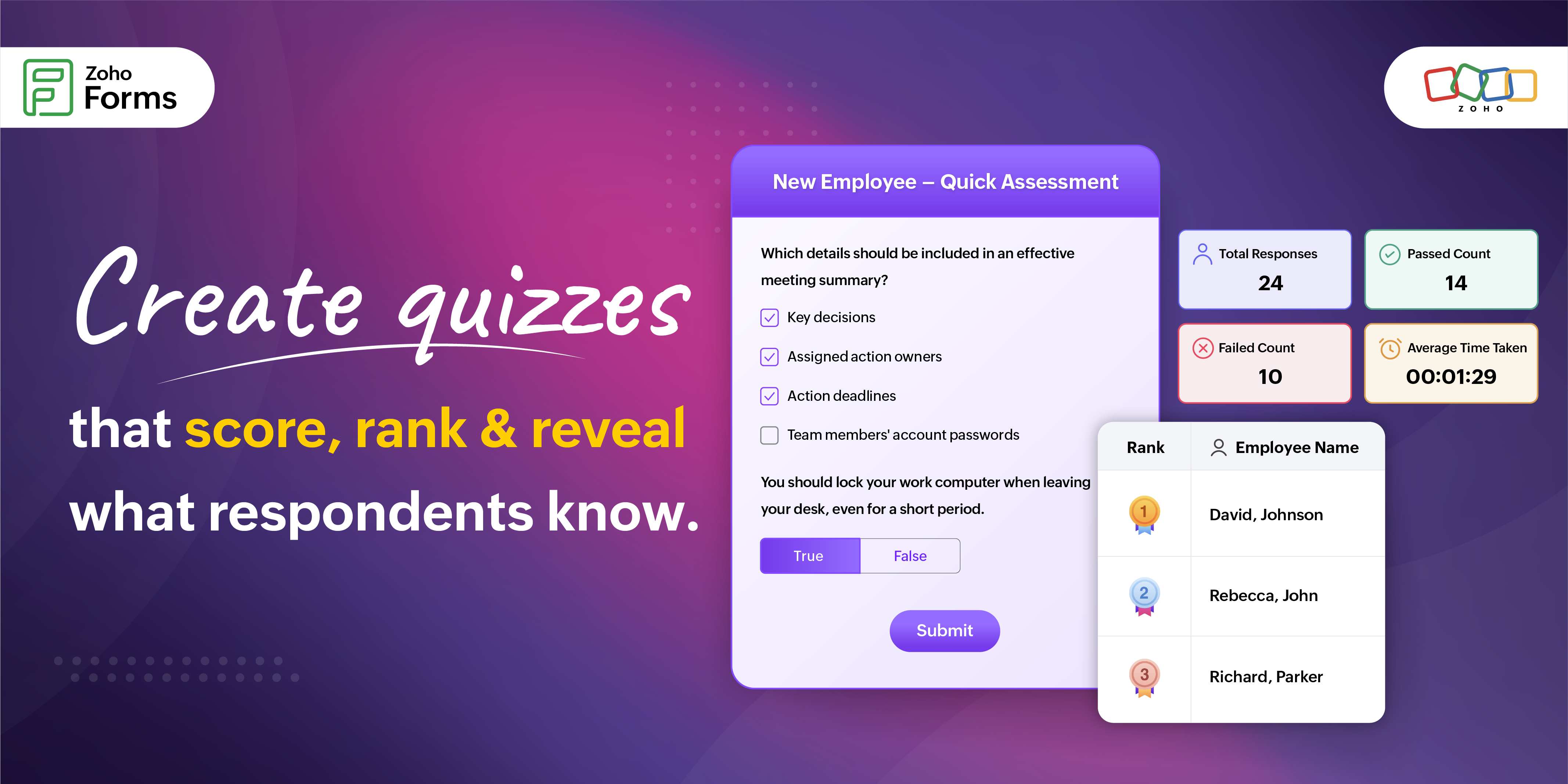
A quiz form doesn't just gather responses: It evaluates them, scores them, ranks participants, and tells a story about their performance.
First impressions begin before the first question
Every Quiz Form in Zoho Forms automatically includes a dedicated Welcome Page.
Instead of dropping respondents directly into the assessment, you can:
- Explain the quiz
- Provide instructions
- Showcase your branding
- Collect participant details like name and email
- Display quiz duration, total points, number of questions, and passing score
It's a simple addition that makes assessments feel far more professional.
Ask the questions your way
Some questions need a single correct answer. Others need multiple selections.
Some require participants to type a number, while others may involve identifying an image.
Quiz Forms supports all of these through dedicated Quiz Fields, including Single Line, Number, Decimal, Radio, Checkbox, Dropdown, Multiple Choice, Yes/No, Image Choices, and more.
Each question can have its own answer key and point value, making every assessment as simple or sophisticated as you need.
Make every question count
Not every question deserves equal weight. Some concepts are foundational. Others are bonus questions.
With Quiz Forms, every question can have its own score.
Simply define the correct answer, set the point value, and edit them anytime before publishing.
As you build your quiz, every configured question displays its point value, making it easy to balance your assessment.
Keep quizzes fair for everyone
Quiz Forms includes several features designed to create a fair testing experience.
- Shuffle questions: Present questions in a different order for every participant.
- Shuffle answer choices: Prevent memorization based on option positions.
- Set a passing score: Automatically determine who passes and who doesn't.
- Display question points: Let participants know which questions carry more weight.
Time matters
Sometimes knowledge isn't the only thing being tested. Speed matters too.
Enable the built-in countdown timer to:
- Limit quiz duration
- Automatically submit responses when time runs out
- Customize the timer label
Personalize the timer's appearance to match your form theme
Publish with confidence
Nobody wants to discover a mistake after hundreds of participants have already submitted the quiz. That's why Quiz Forms includes a complete testing stage before publishing.
You can simulate respondent submissions, verify scoring, test timers, review reports, and make corrections.
Once published, answer keys, scoring, and quiz questions become locked to preserve assessment integrity.
The insights begin after the quiz ends
Collecting responses is only half the story. Understanding them is where the real value begins.
Quiz Forms gives you 3 powerful ways to analyze submissions.
List View
Review every participant's responses along with:
- Quiz score
- Pass/fail status
- Correct answers
- Incorrect answers
- Skipped questions
Ranking View
Want to know who performed the best?
Ranking View automatically orders respondents by score and even highlights the top three performers.
Perfect for competitions, certifications, recruitment assessments, employee evaluations, and more.
Questions View
Ever wondered which question confused the most people?
Questions View provides exactly that.
For every question, you can see:
- How many answered correctly
- How many answered incorrectly
- Skipped responses
- Answer distribution
- Pie chart visualizations
Go beyond scores
Quiz results aren't limited to reports.
Quiz variables like quiz score, pass/fail result, correct answers, wrong answers, and skipped questions can be used throughout Zoho Forms in thank-you pages, email notifications, PDF documents, and form rules.
That means participants can instantly receive personalized messages based on their performance.
Here is what you get in one place with Quiz Forms in Zoho Forms in a nutshell:
What you want | What Quiz Forms gives you |
Grade automatically | Answer keys and points on every quiz field |
Set a bar | An optional pass score, with a Pass or Fail result |
Keep it fair | Shuffle questions and shuffle choices |
Add pressure | An optional countdown timer that auto-submits at zero |
Welcome people | A Welcome Page with instructions before the quiz starts |
See who did best | Ranking View, Questions View and List View |
Who can use Quiz Forms?
Quiz Forms are equally valuable for education industry, human resources, corporate training, marketing, and many more places.
Explore how to build Quiz Forms in Zoho Forms
Quiz Forms are just getting started. In our next blog, we'll explore real-world use cases showing you how different teams can turn quizzes into powerful business tools. Stay tuned!
 Samhita V
Samhita is a seasoned product expert at Zoho Forms who blends deep product expertise and user education to help businesses make sense of powerful features without the jargon. Known for her thoughtful storytelling and crisp communication, she adds a subtle creative flair to every piece she writes. With a knack for spotting real-world use cases and adding a touch of fun to her narratives, she’s on a mission to make even the most complex workflows feel approachable. Beyond the desk, she channels her creativity into dance and mural art, finding new ways to infuse her surroundings with color, rhythm, and meaning.